

Sticky Notes

harneit
Sun, 03/06/2011 - 04:26 pm
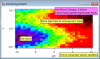
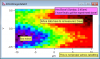
Just type away while your mouse is over a graph to create a "Sticky" (a.k.a. sticky note, or text box)
Usage:
1. Create a graph, bring it to the front.
2. Call InstallStickies() for the top graph window or choose "use stickies in top graph" from the Stickies menu.
3. Point the mouse somewhere inside the graph, start typing.
That's it.
Full documentation in the Procedure file.
View All Releases
Usage:
1. Create a graph, bring it to the front.
2. Call InstallStickies() for the top graph window or choose "use stickies in top graph" from the Stickies menu.
3. Point the mouse somewhere inside the graph, start typing.
That's it.
Full documentation in the Procedure file.
Images:
Project Details
Current Project Release
Sticky Notes IGOR.6.20.x-1.0
| Release File: | Stickies.ipf |
| Version: | IGOR.6.20.x-1.0 |
| Version Date: | Sun, 03/06/2011 - 04:27 pm |
| Version Major: | 1 |
| Version Patch Level: | 0 |
| OS Compatibility: | Mac-Intel Windows |
| Release Notes: | First release. See procedure file for documentation. |

Forum

Support

Gallery
Igor Pro 9
Learn More
Igor XOP Toolkit
Learn More
Igor NIDAQ Tools MX
Learn More