

Multiple file loader front end

Fri, 04/18/2008 - 01:24 pm
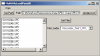
A small panel is presented to the user for loading multiple files into an Igor experiment. This panel gives the user the ability to navigate to the disk folder containing files to load. A listbox is then updated to show a list of files in that folder. The shift key can be used to define contiguous groups of files and the control key (Win) or command key (Mac) can be used to select and deselect individual files in the listbox. Finally a button "GetFiles" is used to end file selection and initiate further code exection. The panel code stores its waves in its own subfolder.
The 3/22/2010 update (MultiFileLoader_1.ipf) incorporates several improvements aimed to make it easier to use and incorporate into other applications:
--Added data structure (structJTG_MFL) to hold the list of selected file names and path to disk folder holding those files. This should make it simpler to pass the file list onto a file loading function.
--Modified popFuncList Popup Menu. This Popup Menu can be used to select a function to process the list of selected files. All functions in memory ending in "_MFL" will be included in the list automatically and the selected function will be called when the list of selected files has been assembled.
See Release Notes and comments in the procedure file for additional details. Although this procedure was developed on Igor 6.12a, it should still be compatible with version 5.00 and above.
Images:
Project Details
Current Project Release
Multiple file loader front end IGOR.6.12.x-1.3
| Release File: | MultiFileLoader_1.ipf |
| Version: | IGOR.6.12.x-1.3 |
| Version Date: | Mon, 03/22/2010 - 01:27 pm |
| Version Major: | 1 |
| Version Patch Level: | 3 |
| OS Compatibility: | Windows Mac-Intel |
| Release Notes: |
This 3/22/2010 release incorporates the following changes |

Forum

Support

Gallery
Igor Pro 9
Learn More
Igor XOP Toolkit
Learn More
Igor NIDAQ Tools MX
Learn More