

Check for user input with timeout


Larry Hutchinson
Thu, 09/04/2008 - 08:17 am
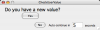
If the function returns true indicating the user has clicked the "Yes" button, you can then use the techniques described in the help for PauseForUser or DoPrompt to fetch the actual input.
Put the following in the procedure window and then execute:
print UserHasValue(10)
Function UserHasValue(secsToWait)
Variable secsToWait
NewPanel /N=CheckUserValue/W=(285,111,738,225)
SetDrawEnv textxjust= 2,textyjust= 1
DrawText 317,92,"Auto-continue in"
SetDrawEnv textyjust= 1
DrawText 384,93,"seconds"
SetDrawEnv fsize= 20,textyjust= 1
DrawText 22,21,"Do you have a new value?"
ValDisplay vd0,pos={326,78},size={50,28},bodyWidth=50,fSize=20
ValDisplay vd0,limits={0,0,0},barmisc={0,1000},value= _NUM:secsToWait
Button bYes,pos={99,36},size={77,27},title="Yes"
Button bNo,pos={157,80},size={49,21},title="No"
DoUpdate/W=CheckUserValue/E=1 // mark this as a progress window
Variable tstart= ticks
Variable secsLeft= secsToWait
Variable userHasValue= 0
do
Variable t0= ticks
do
while( ticks < (t0+10) )
secsLeft= round(secsToWait - (ticks-tstart)/60)
ValDisplay vd0,value= _NUM:secsLeft,win=CheckUserValue
DoUpdate/W=CheckUserValue
if( V_Flag == 2 ) // user clicked a button
userHasValue= CmpStr("bYes",S_name) == 0
break
endif
while( secsLeft > 0 )
KillWindow CheckUserValue
return userHasValue
end
Variable secsToWait
NewPanel /N=CheckUserValue/W=(285,111,738,225)
SetDrawEnv textxjust= 2,textyjust= 1
DrawText 317,92,"Auto-continue in"
SetDrawEnv textyjust= 1
DrawText 384,93,"seconds"
SetDrawEnv fsize= 20,textyjust= 1
DrawText 22,21,"Do you have a new value?"
ValDisplay vd0,pos={326,78},size={50,28},bodyWidth=50,fSize=20
ValDisplay vd0,limits={0,0,0},barmisc={0,1000},value= _NUM:secsToWait
Button bYes,pos={99,36},size={77,27},title="Yes"
Button bNo,pos={157,80},size={49,21},title="No"
DoUpdate/W=CheckUserValue/E=1 // mark this as a progress window
Variable tstart= ticks
Variable secsLeft= secsToWait
Variable userHasValue= 0
do
Variable t0= ticks
do
while( ticks < (t0+10) )
secsLeft= round(secsToWait - (ticks-tstart)/60)
ValDisplay vd0,value= _NUM:secsLeft,win=CheckUserValue
DoUpdate/W=CheckUserValue
if( V_Flag == 2 ) // user clicked a button
userHasValue= CmpStr("bYes",S_name) == 0
break
endif
while( secsLeft > 0 )
KillWindow CheckUserValue
return userHasValue
end

Forum

Support

Gallery
Igor Pro 9
Learn More
Igor XOP Toolkit
Learn More
Igor NIDAQ Tools MX
Learn More